VSCode 入门教程
本页最后更新于 ,内容可能过时
1. 详细完整配置教程(推荐)
下面这两期视频讲得很细,可以跟着做一遍:
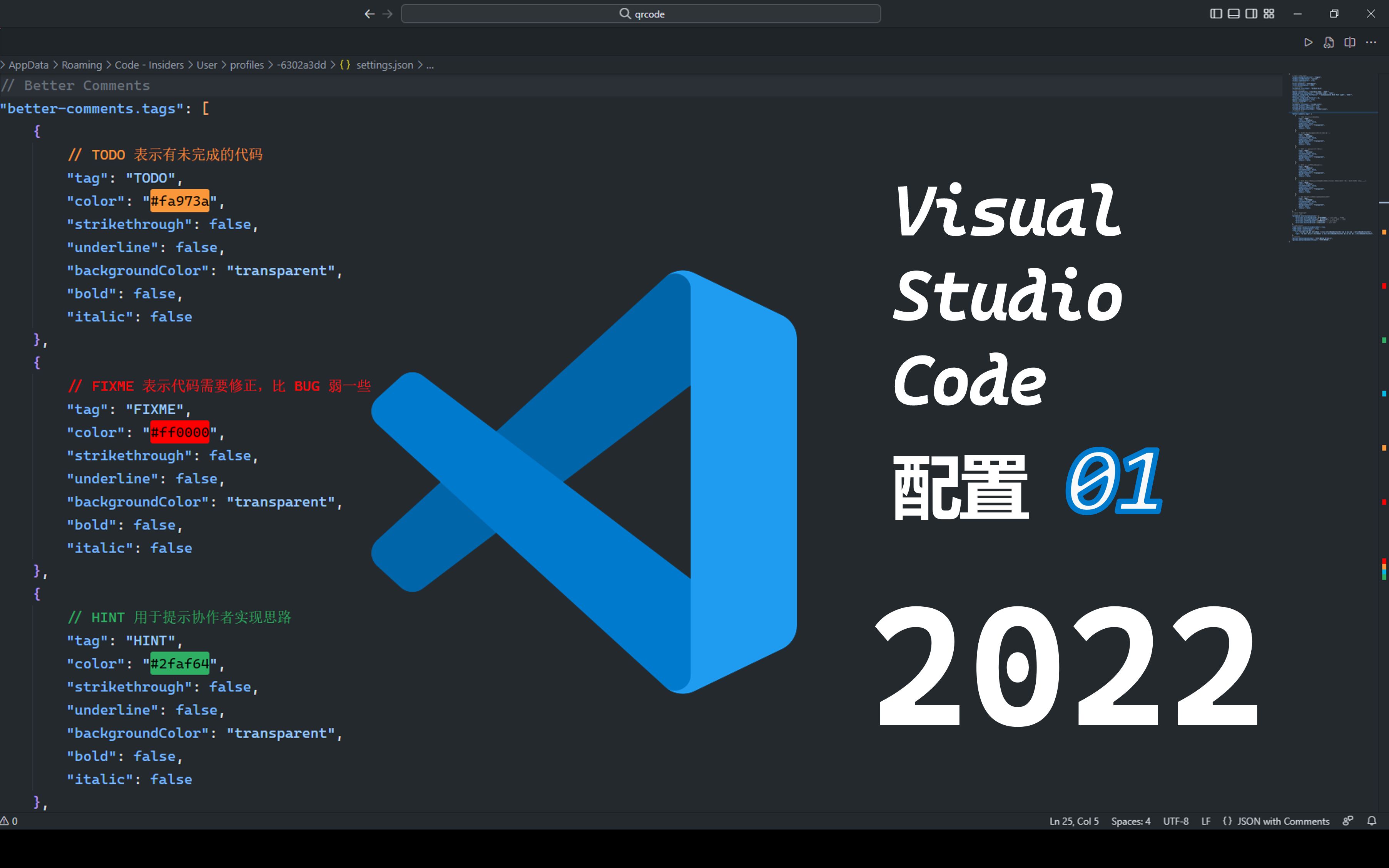
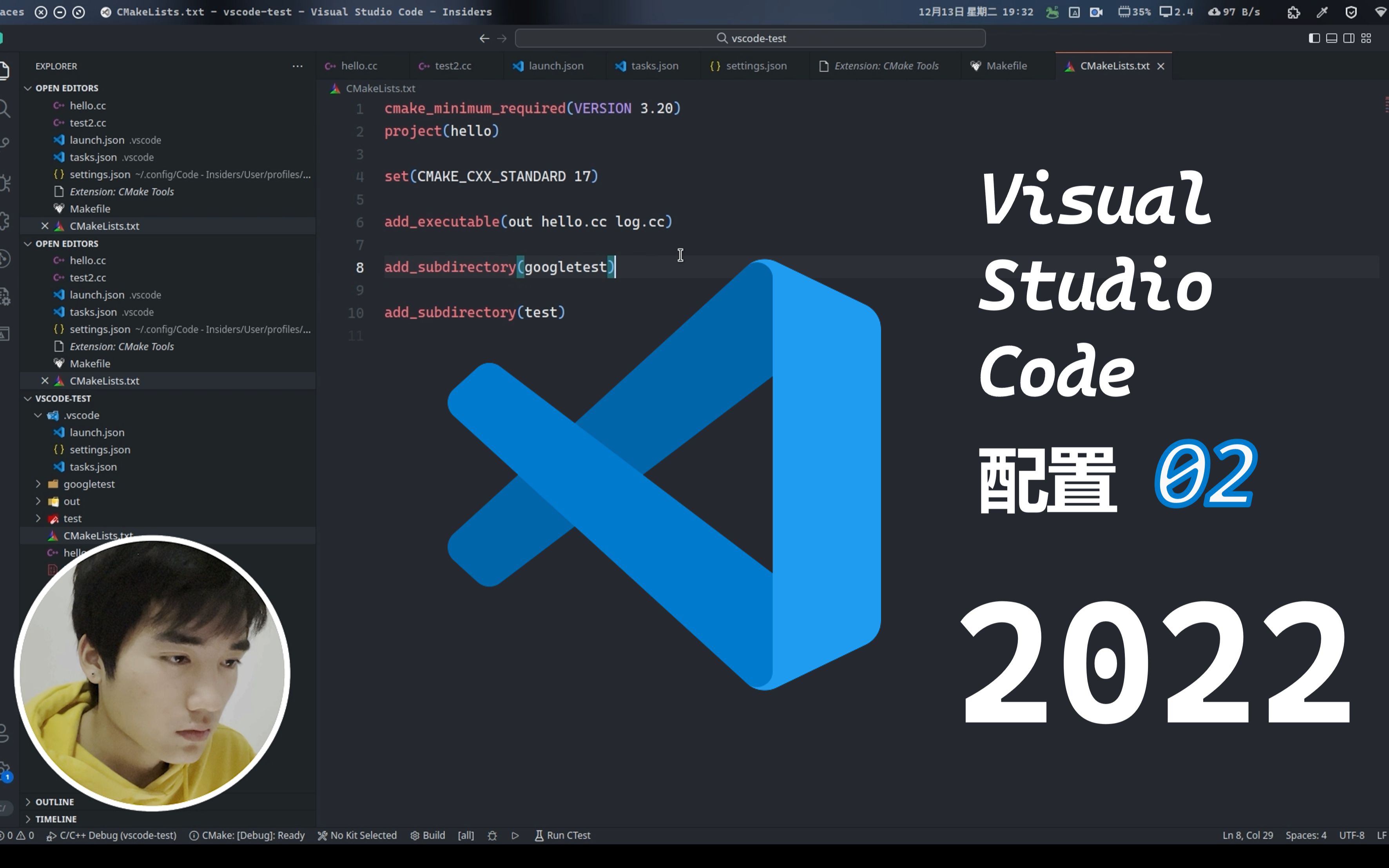
2. 合集:VSCode的实用小技巧短视频

配置教程的补充1:VSCode 新建配置文件
视频里的第一步是新建一个配置文件(Profile)。这一步在视频里的操作画面被挡住了,看不清,所以这里补一份文字版步骤:
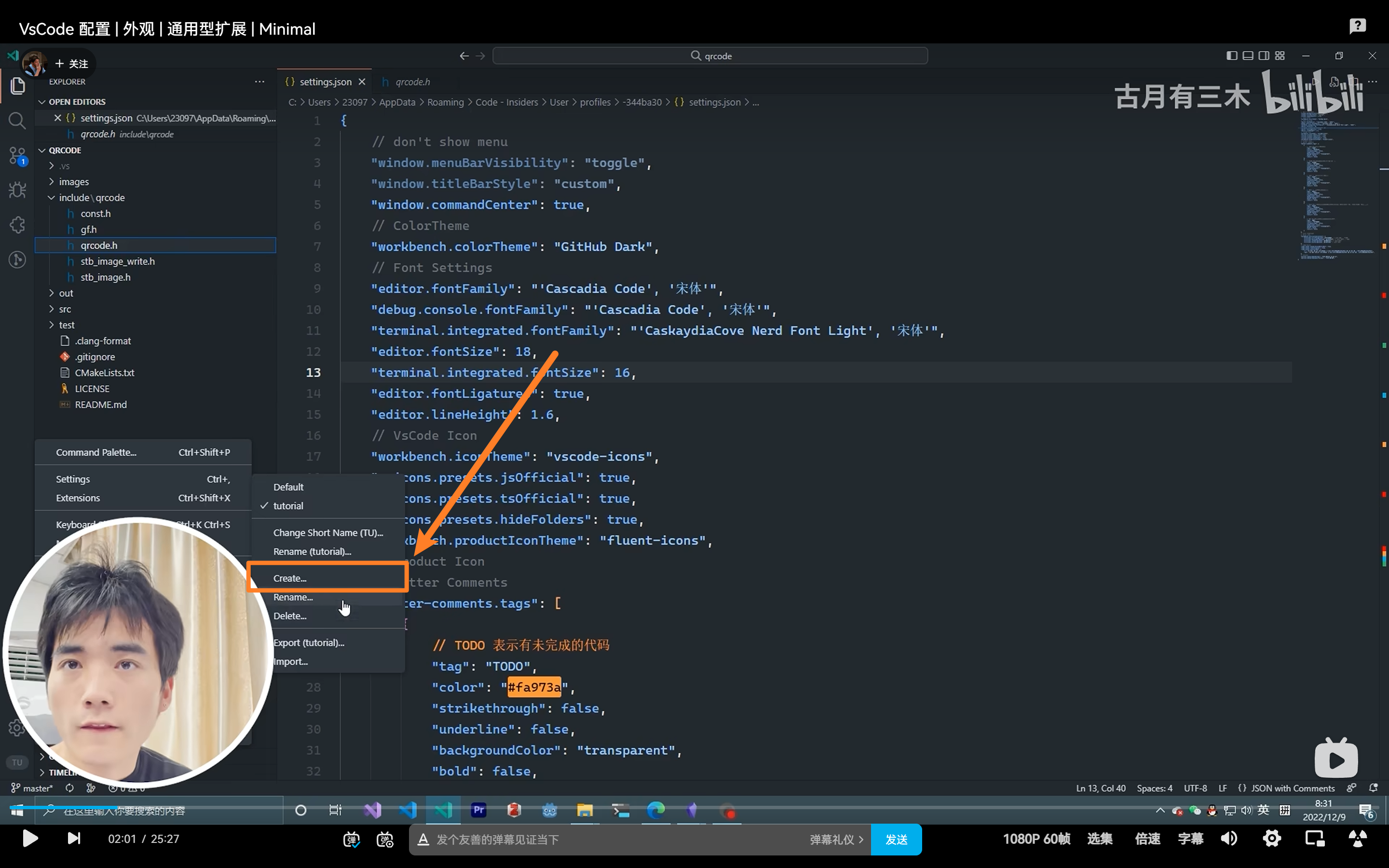
第 1 步:打开配置文件页面
点左下角的齿轮图标(Manage / 管理),菜单里有一项 Profiles。鼠标移上去会展开子菜单,在子菜单里点 Profiles:
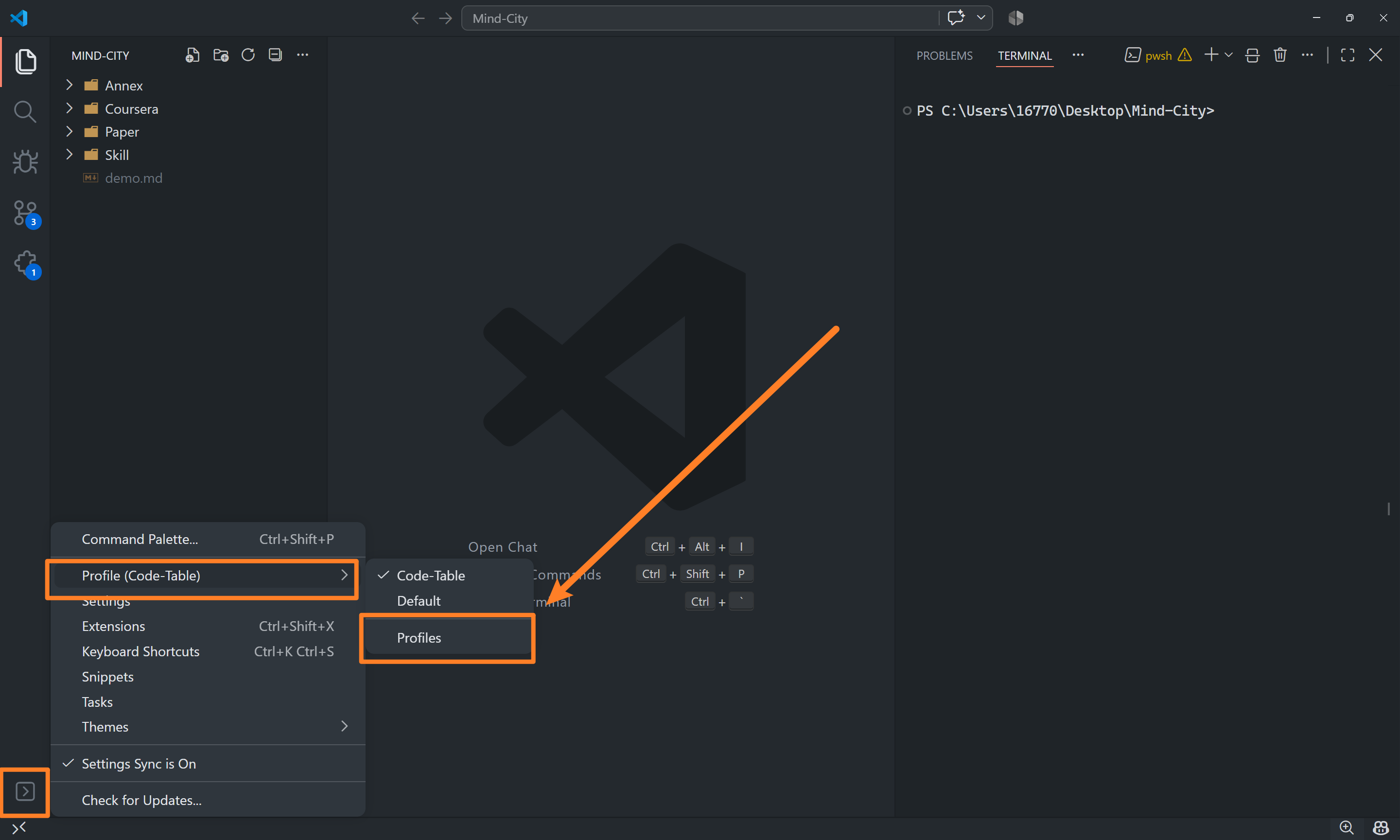
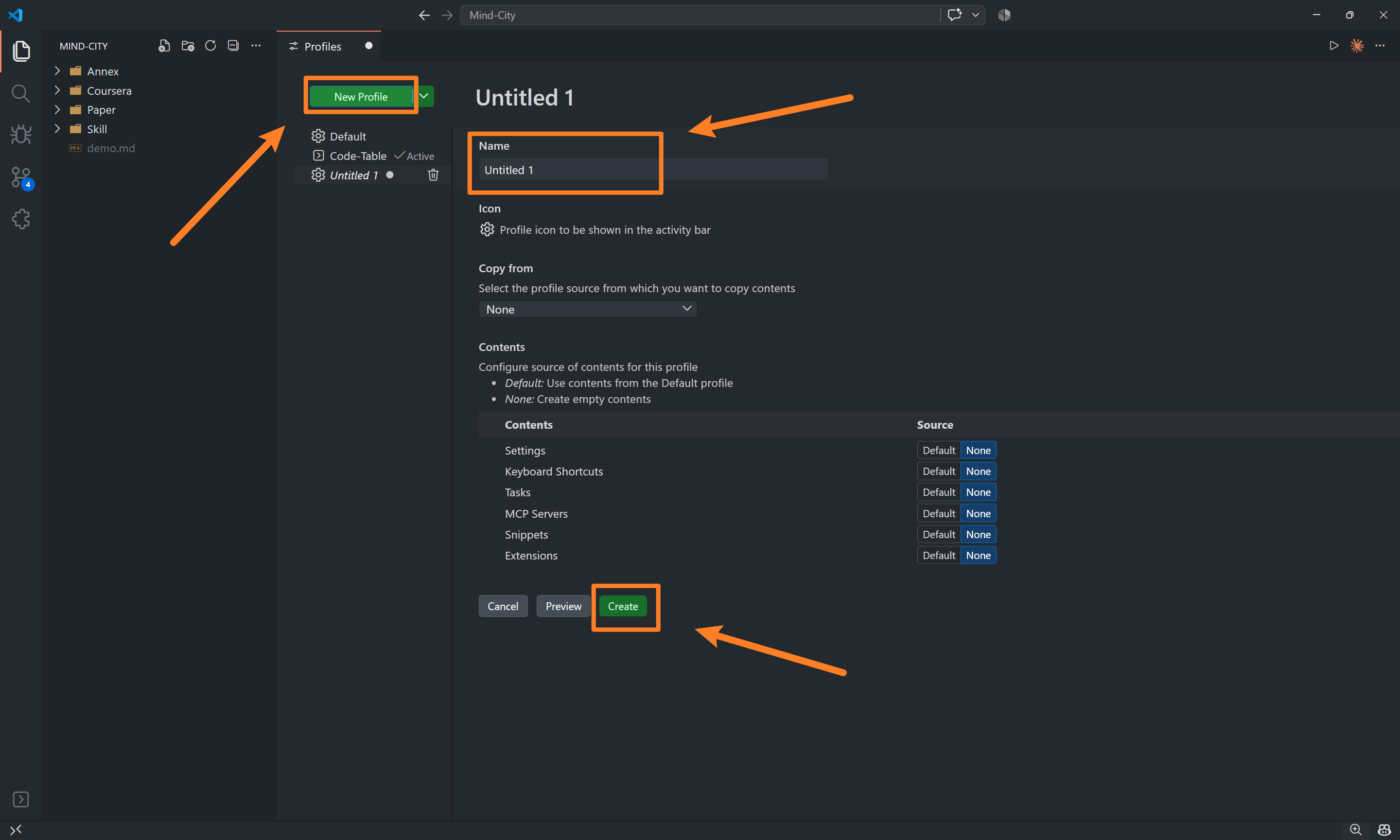
第 2 步:创建新的配置文件并保存
配置文件页面打开后,点左上角的 New Profile,在 Name 里填一个名字,然后点 Create:
第 3 步:勾选启用新配置文件
回到左边的配置文件列表,找到刚建好的那个,点它名字后面的小方框勾选,把它切换成当前正在使用的配置文件:
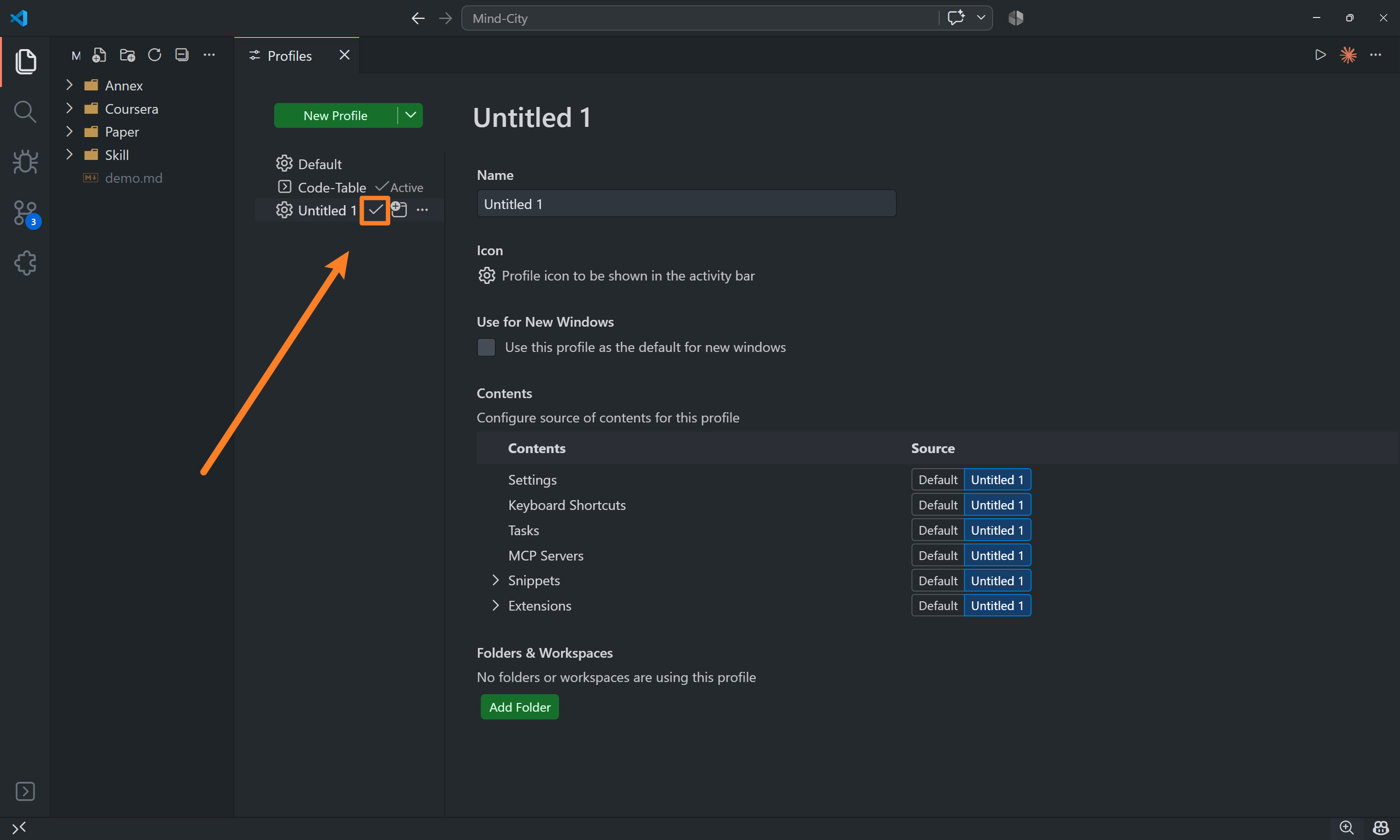
启用之后,它旁边会显示 Active 字样,说明现在用的就是它。
到这里准备工作就完成了,视频后面的内容就可以接着往下做了。
配置教程的补充2:Code-Runner 快捷命令
点一下 ▷ 就能跑代码,是因为 Code Runner 执行了一条命令。这条命令本身是可以改的 —— 改过之后,就可以自己决定用什么编译器、生成的可执行文件叫什么名字、放到哪里去。
配置写在 settings.json 里,键名是 code-runner.executorMap。
第 1 步:先认识这些占位符
命令里那些以 $ 开头的词,Code Runner 会在真正执行前把它们替换成实际的路径。有了这套占位符,才能做到「不管你跑的是哪个文件,命令都不用改」:
| 占位符 | 替换成什么 |
|---|---|
$workspaceRoot |
你在 VSCode 里打开的那个文件夹(工作区)的路径 |
$dir |
需要运行的代码文件,所在的目录 |
$dirWithoutTrailingSlash |
同上,只是结尾不带斜杠 |
$fileName |
需要运行的代码文件的名字 |
$fileNameWithoutExt |
需要运行的代码文件的名字,再去掉扩展名 |
$fullFileName |
需要运行的代码文件的名字,并且带目录 |
$driveLetter |
文件所在的盘符(只有 Windows 用得上) |
$pythonPath |
Python 解释器的路径(跑 Python 时才有意义,用 Python: Select Interpreter 设置) |
只看这张表不容易理解,举个例子就清楚了。
假设你在 WSL 里打开的文件夹是 /home/ethan/code,现在要跑的是这个文件夹里的 hello.c:
| 占位符 | 替换结果 |
|---|---|
$workspaceRoot |
/home/ethan/code |
$dir |
/home/ethan/code |
$fullFileName |
/home/ethan/code/hello.c |
$fileName |
hello.c |
$fileNameWithoutExt |
hello |
第 2 步:两种常见写法
写法一:可执行文件和源代码放在一起(推荐)
把上面的占位符代进去,这条命令展开后等价于:
逐段看它是怎么工作的:
cd $dir:切到代码文件所在的目录。cd就是 change directory 的缩写。因为后面用到的都是相对路径,不切过去 gcc 就找不到你的文件。&&:把两条命令连起来,表示「左边成功了,才执行右边」。所以代码编译不通过的时候,右边那条命令就不会执行。gcc -o $fileNameWithoutExt $fileName:执行编译的一句,展开是gcc -o hello hello.c。-o是 output 的缩写,跟在它后面的是「编译出来的可执行文件叫什么名字」。这里取的是去掉扩展名的文件名,所以hello.c编译出来得到的是hello。
$dir$fileNameWithoutExt:运行刚编译出来的那个程序。
写法二:可执行文件单独放进 bin 目录(视频里演示的)
"c": "cd $dir && mkdir -p bin && gcc -o bin/$fileNameWithoutExt $fileName && bin/$fileNameWithoutExt"
同样展开一遍:
mkdir -p bin:新建一个叫bin的目录。mkdir就是 make directory 的缩写bin是 binary(二进制文件)的缩写,Linux 上习惯用它来装可执行程序-p的意思是「目录如果已经存在,就什么都不做」
gcc -o bin/$fileNameWithoutExt $fileName:编译,但把程序输出到bin里面,也就是bin/hello。bin/$fileNameWithoutExt:运行bin/hello。
好处是源代码目录比较整洁:一堆 .c 文件,加上一个 bin 目录,编译产物全在里面,不会和源码混在一起。
但不太推荐这一条,原因在后面的调试:等你要配 VSCode 的调试(launch.json、tasks.json)、或者用 Makefile 的时候,这些工具默认都假设可执行文件放在源代码旁边。放进 bin 之后,每一处都得手动改一遍路径,多一处配置就多一个出错的地方。
第 3 步:把配置写进去
改 settings.json 有两个入口,用哪个都行:
- 按 Ctrl+Shift+P 打开命令面板,输入
Open User Settings (JSON),回车 - 或者按 Ctrl+, 打开设置界面,搜索
code-runner.executorMap,点旁边的「在 settings.json 中编辑」
打开后内容如下,把 executorMap 那一项加进去(注意它要放在最外层的大括号里):
{
    "code-runner.executorMap": {
        "c": "cd $dir && gcc -o $fileNameWithoutExt $fileName && $dir$fileNameWithoutExt"
    }
}
Ctrl+S 保存后立刻生效,不用重启 VSCode。
助教的 VSCode 完整配置文件
// 只保留这个默认配置文件 Default 就够用了
// 其他的用户自定义配置文件都可以删除
{
    "window.zoomLevel": 0,
    "window.zoomPerWindow": true,
    "window.commandCenter": true,
    "window.title": "${rootName}",
    "window.newWindowProfile": "Default",

    "window.dialogStyle": "custom",
    "window.restoreWindows": "none",
    "window.menuBarVisibility": "hidden",
    "window.enableMenuBarMnemonics": false,
    "window.newWindowDimensions": "maximized",
    "security.workspace.trust.enabled": false,


    "workbench.colorTheme": "GitHub Dark",
    "workbench.iconTheme": "vscode-icons",
    "workbench.productIconTheme": "fluent-icons",

    "workbench.settings.editor": "json",
    "workbench.experimental.modernUI": false,
    "workbench.layoutControl.enabled": false,
    "workbench.panel.defaultLocation": "right",
    "workbench.editorLargeFileConfirmation": 4,
    "workbench.navigationControl.enabled": false,
    "workbench.secondarySideBar.defaultVisibility": "hidden",

    "workbench.editor.useModal": "off",
    "workbench.editor.wrapTabs": true,
    "workbench.editor.empty.hint": "hidden",
    "workbench.editor.scrollToSwitchTabs": true,
    "workbench.editor.alwaysShowEditorActions": true,
    "workbench.editor.doubleClickTabToToggleEditorGroupSizes": "off",
    "workbench.editor.customLabels.enabled": true,
    "workbench.editor.customLabels.patterns": {
        "**/SKILL.md": "${dirname} /SKILL.md",
    },


    "explorer.confirmDelete": false,
    "explorer.confirmDragAndDrop": false,
    "explorer.confirmPasteNative": false,
    "explorer.fileNesting.enabled": true,
    "explorer.fileNesting.expand": false,
    "explorer.incrementalNaming": "smart",
    "explorer.fileNesting.patterns": {
        "package.json": "package-lock.json",
        "pyproject.toml": "uv.lock",
    },


    "files.autoSave": "afterDelay",
    "files.autoSaveDelay": 300,
    "files.exclude": {
        "**/.gitignore": true,
        "**/.gitkeep": true,

        "**/__pycache__": true,
        "**/uv.lock": true,
    },


    "editor.tabSize": 4,
    "editor.fontSize": 15,
    "editor.lineHeight": 1.65,
    "editor.fontLigatures": false,
    "editor.fontFamily": "Cascadia Code",
    "editor.lightbulb.enabled": "off",
    "editor.unicodeHighlight.ambiguousCharacters": false,


    "terminal.integrated.fontSize": 14,
    "terminal.integrated.fontFamily": "Cascadia Code",
    "terminal.integrated.defaultProfile.windows": "PowerShell",

    "terminal.integrated.inheritEnv": false,
    "terminal.integrated.initialHint": false,
    "terminal.integrated.enableMultiLinePasteWarning": "never",


    "scm.diffDecorations": "none",
    "search.useIgnoreFiles": true,
    "network.meteredConnection": "off",
    "extensions.ignoreRecommendations": true,
    "settingsSync.keybindingsPerPlatform": false,
    "vsicons.dontShowNewVersionMessage": true,


    "git.autofetch": true,
    "git.confirmSync": false,
    "git.enableSmartCommit": true,
    "git.decorations.enabled": false,
    "git.openRepositoryInParentFolders": "never",


    "github.copilot.nextEditSuggestions.enabled": false,
    "github.copilot.chat.localeOverride": "zh-CN",
    "claudeCode.useTerminal": true,


    "markdown.preview.fontSize": 15,
    "markdown.preview.breaks": true,
    "markdown.preview.linkify": true,
    "markdown.preview.lineHeight": 1.6,
    "markdown.preview.markEditorSelection": false,
    "markdown.preview.scrollPreviewWithEditor": true,
    "markdown.preview.scrollEditorWithPreview": false,
    "markdown.preview.doubleClickToSwitchToEditor": true,
    "markdown.preview.fontFamily": "Cascadia Code",
    "markdown.styles": [ "https://cdn.jsdelivr.net/gh/EthanCaol/mathpix-markdown-studio@f9822203519b440daed65d5d767af4425e9cb1e2/styles/Markdown.css" ],
    "[markdown]": {
        "editor.wordWrap": "off",
        "editor.wordWrapColumn": 60,
        "editor.tabSize": 4,
        "editor.defaultFormatter": "yzhang.markdown-all-in-one"
    },


    "code-runner.saveAllFilesBeforeRun": true,
    "code-runner.runInTerminal": true,
    "code-runner.executorMap": {
        "typescript": "cd $dir && npm run dev",
        "python": "cd $dir && python $fileName",
        "cpp": "cd $dir && g++ -o $fileNameWithoutExt $fileName && $dir$fileNameWithoutExt",
        "c": "cd $dir && gcc -o $fileNameWithoutExt $fileName && $dir$fileNameWithoutExt",
    },
    "code-runner.executorMapByFileExtension": {
        ".cu": "cd $dir && nvcc $fileName -o $fileNameWithoutExt && $dir$fileNameWithoutExt",
        ".vue": "cd $dir && npm run dev",
    },


    "bashIde.shfmt.path": "shfmt",
    "bashIde.shellcheckPath": "shellcheck",
    "[shellscript]": {
        "editor.defaultFormatter": "mads-hartmann.bash-ide-vscode"
    },


    "C_Cpp.default.cStandard": "gnu23",
    "C_Cpp.default.cppStandard": "gnu++23",
    "C_Cpp.formatting": "clangFormat",
    "C_Cpp.clang_format_sortIncludes": false,
    "C_Cpp.clang_format_fallbackStyle": "{ BasedOnStyle: WebKit, IndentWidth: 4, ColumnLimit: 120, AlignTrailingComments: true, IndentCaseLabels: true, BreakTemplateDeclarations: true }",

    "C_Cpp.inlayHints.parameterNames.enabled": true,
    "C_Cpp.inlayHints.referenceOperator.enabled": false,
    "C_Cpp.inlayHints.autoDeclarationTypes.enabled": true,
    "C_Cpp.inlayHints.autoDeclarationTypes.showOnLeft": true,
    "C_Cpp.inlayHints.parameterNames.hideLeadingUnderscores": true,
    "C_Cpp.inlayHints.parameterNames.suppressWhenArgumentContainsName": true,


    "makefile.makePath": "make",
    "makefile.configureOnOpen": false,
    "makefile.configureOnEdit": false,
    "makefile.makefilePath": "${workspaceFolder}/Makefile",

    "cmake.cmakePath": "cmake",
    "cmake.configureOnOpen": false,
    "cmake.configureOnEdit": false,
    "cmake.generator": "Unix Makefiles",
    "cmake.buildBeforeRun": true,
    "cmake.clearOutputBeforeBuild": true,
    "cmake.sourceDirectory": "${workspaceFolder}",
    "cmake.buildDirectory": "${workspaceFolder}/build",
    "cmake.debugConfig": { "args": [] },
    "cmake.pinnedCommands": [
        "workbench.action.tasks.configureTaskRunner",
        "workbench.action.tasks.runTask"
    ],


    "python.analysis.typeCheckingMode": "off",
    "python.analysis.inlayHints.variableTypes": true,
    "python.analysis.inlayHints.functionReturnTypes": true,
    "python.analysis.inlayHints.callArgumentNames": "partial",
    "python.terminal.activateEnvironment": false,
    "python.terminal.activateEnvInCurrentTerminal": false,
    "[python]": {
        "editor.defaultFormatter": "ms-python.black-formatter",
    },


    "jupyter.askForKernelRestart": false,
    "jupyter.interactiveWindow.textEditor.executeSelection": true,

    "notebook.markup.fontSize": 20,
    "notebook.stickyScroll.enabled": true,
    "notebook.output.fontSize": 15,
    "notebook.output.lineHeight": 0,
    "notebook.output.wordWrap": false,
    "notebook.output.scrolling": false,
    "notebook.output.textLineLimit": 40,
    "notebook.output.linkifyFilePaths": true,
    "notebook.output.fontFamily": "Cascadia Code",
    "remote.SSH.remotePlatform": {
        "mind-city": "linux"
    },


}
文档完成登记:完成本文全部流程后告知助教